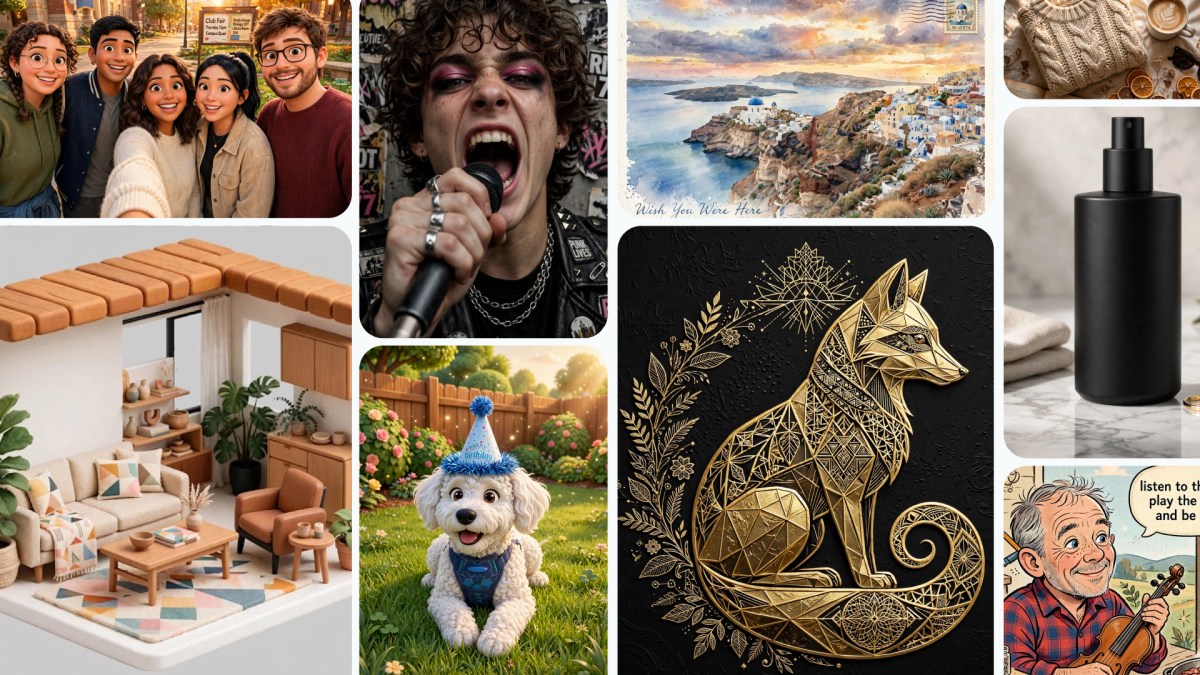
Today, Meta is rolling out Muse Image, the company’s first image generation model from Meta Superintelligence Labs, now available in Meta AI. Muse Spark made Meta AI a smarter assistant; now, Muse Image acts as the creative partner that knows your world, making it easy to turn your ideas into high-quality visuals that you can download and share anywhere, including directly to your feed, story, or chat.
The model also powers new creative tools across Meta’s apps. You can use more than 30 new AI-powered effects for Instagram Stories and generate images in your direct chats with Meta AI on WhatsApp — starting in limited countries with more locations on the way.
Story Effects on Instagram
Simple Prompts, High-Quality Outputs
Whether you’re starting from scratch or working with an existing photo, you can describe what you want in simple, conversational language, and Meta AI handles the rest thanks to Muse Image. Ask it to mock up an image of you in front of a historical landmark, cleanly erase a photobomber from the background of a shot, or write a custom prompt to build a functional QR code. It will also render text cleanly inside your visuals, meaning you can ask for a how-to guide or a detailed infographic on a specific subject, and the text comes out legible and styled to match.
Suggested Presets to Help You Get Started
Sometimes the hardest part of creating is getting started. Meta AI now includes a presets panel with suggested prompts to help inspire you. One tap restores an old family photo, lets you see yourself with trending hairstyles, or reimagines you as a claymation character or a 16-bit video game hero. Whatever you create, it’s easy to share with friends across Meta’s apps so they can try the same preset on their own photos.
Shop Your Room Redesigns
You can also snap a photo of your room and ask Meta AI to redesign it with real products from the web or Facebook Marketplace. Suggest a style you love or ask Meta AI to pull from what’s trending to see what your space looks like with a full makeover.
An Intelligent Creative Partner
Muse Image doesn’t just build an image; it thinks through your prompt first. By pairing up with Muse Spark, the model takes multiple steps behind the scenes — planning its layout, looking up real-time web context, and intelligently blending multiple visual references at once. Whether you want to place your pet in a famous painting or combine a selfie with a vacation photo to create a custom postcard, Meta AI handles the complex reasoning for you so the final visual matches your vision perfectly.
Rooted in Your World
You can also @-mention Instagram accounts in the Meta AI app to bring specific Instagram profiles right into your images. Whether you want to design a custom event invitation, mock up a collaborative creative concept, or generate a personalized graphic, tagging a username lets Meta AI use public photos to build a visual that’s ready to post. You have control over how your content can be tagged for AI creation with an easy setting to turn this feature off at any time.
Edit Directly on the Photo
To make a change, just tap the markup icon on your creation to circle, sketch, or annotate edits right on top of the photo. Since Meta AI remembers the full context of your conversation, you can keep refining by swapping styles, adding elements, or tweaking details — all without starting from scratch.
What’s Next
Soon, Meta will bring Muse Image to more countries and the places where people use Meta AI, including Facebook and Messenger, and additional surfaces on Instagram and WhatsApp. In the coming weeks, advertisers and agencies will be able to tap into Muse Image through Advantage+ creative.
Using Meta AI with Muse Image is free for everyday creation. For people who want to create even more, it’s available as part of Meta’s subscription plans.
Images are just the beginning. With Muse Video already in development, Meta is building entirely new ways for you to bring your ideas to life, getting one step closer to personal superintelligence.