It’s become a cliché that the first thing a marketing leader wants to do is change the website. Well, dear readers, I’ve been that cliché… more than once.
And I’ve lived to regret it. The refreshed website looked good, but it didn’t move the rest of the funnel.
That’s why I’m so bullish on Ploy, the marketing platform that turns your website into an always-on growth engine. Think of it as an AI growth teammate that works around the clock: building ABM pages, launching campaign landing pages, de-anonymizing website visitors, and automating growth workflows.
Hi, it’s Kyle and welcome to Growth Unhinged, my weekly newsletter exploring the hidden playbooks behind the fastest-growing startups.
In this newsletter I try to cover a wide spectrum of GTM. But there’s been a glaring gap: paid acquisition. For B2B, this increasingly means LinkedIn advertising. While far from cheap, LinkedIn ads have reach and the potential for hyper-precise targeting (as I featured previously).
Up today: a playbook for LinkedIn ads from performance marketer Bogdan Liutic. Bogdan runs CR8, a tech-forward LinkedIn ads agency, and has founded two 7-figure businesses built on performance marketing.
A senior B2B buyer takes six to eight touches before they even consider booking a call with you.
That’s why ads by themselves, directing to book a demo or call, are not enough. That’s why cold outreach by itself is not enough. And content by itself is not enough.
What you want is a flow. My LinkedIn ad playbook took me 14 years in growth marketing to figure out, and I’ve compressed it to 10 minutes of your time. You’ll walk away with:
Clarity on how LinkedIn ads actually work, what works, and what doesn’t
A map for your own LinkedIn ad campaign
How to drop cost per lead with very specific hacks

We all know LinkedIn ads are expensive, right?
I had a call with this client, let’s call him Mark. He targets CHROs of companies with 100+ employees in regulated industries. He wants more deals.
I asked him the classic discovery question: “What you tried before?”
“Well… In the last 8 months I’ve spent $30k on Linkedin ads and got 2 leads a month. Maybe 12 leads total, and 8 or 9 of those were the wrong type of lead.”
I am telling you this story to illustrate a simple message. If you don’t nail the fundamentals, no amount of tactics will save you. So, let’s do the fundamentals.
To understand when LinkedIn ads do work, I propose to do the Charlie Munger move: invert. Understand when they don’t work.
First: your average contract value (ACV) or lifetime value (LTV) should be at least $10,000. Otherwise the math just doesn’t fit.
The cost per thousand impressions (CPM) on LinkedIn is $37.42 on average according to Dreamdata, roughly 3-4x Meta’s $10.01. Expensive impressions are fine when one deal pays for months of them; at sub-$10k LTV, it’s tough.
Second: your total addressable market (TAM) on the decision-maker level should be at least 10,000 people. People are not sitting on LinkedIn all the time (surprise!). You need critical mass for LinkedIn ads to work at any given moment. Less than that, do direct outreach, do events.
Third, the obvious one: your ICP should actually be on LinkedIn. Selling to construction crews, cold calling is probably better. Selling to HR leaders, to C-level folks, good bet.
There’s a reason LinkedIn ads are so expensive: the senior decision-makers ARE there. (And measured correctly, it’s actually a cheap channel. It has the lowest cost-per-company-influenced of any social network at $76.42, and the only one with positive return-on-ad-spend; same Dreamdata 2026 report.)
Want to do a self-check-up? Use this live calculator and put in your LTV, close rate (what percentage of qualified sales conversations you actually close), show rate, and media budget.
The goal is the LTV:CAC ratio: 3+ is a green light, 2-3 is workable, below 2, walk away.

The company has a $30k LTV, 22% close rate, and 75% show-up rate.
They spend $3,000 per month on LinkedIn ads.
They can expect ~45 leads per quarter at ~$200 cost-per-lead.
These leads convert to ~15 completed meetings and ~3 deals per quarter.
The CAC is ~$3k on media spend alone, translating to ~3:1 LTV:CAC all-in once fees and sales compensation are included.
Verdict: LinkedIn ads are scalable.
One nuance: the average B2B customer journey is now 272 days from first marketing touch to closed revenue, and 81% of it happens before the sales pipeline based on a Dreamdata study of 3.5 million journeys. This includes 88 touches, 10 stakeholders, and 4 channels.
The ads help get you the sales call. There’s plenty of sales work to close the deal.
Steps 1-3: Choose the right ad audience by harvesting signals.
The conventional idea of an ad campaign looks something like this: go to Campaign Manager, see what filters are available, run some ads to the website, and expect people to book a call.
Results are… meh. You stop the ads, move somewhere else.
We already covered why one touch doesn’t progress anything. But the other problem is the audience itself. Several examples of filters inside LinkedIn Ads that look cool but are trash:
Member groups: You can target members of very specific groups, but more often than not it’s nobody. Groups are kinda dead on LinkedIn, and people forget they joined them years ago.
Company revenue: It’s not accurate. Work on headcount instead, and even that is not fully reliable.
Member skills: You’re relying on how fully people actually fill out their profiles. I wouldn’t go there.
LinkedIn has a lot of important business information, and you should use it. But it doesn’t have all of it, and more often than not it doesn’t have the most important kind. This is what we call signals.
Signals answer the question: what behavior, directly or indirectly, proves a company is in the buying window or about to be? If ideal customer profile (ICP) definitions and filters answer the question who, signals answer the question when.
For collecting signals you need a data source. But what makes a good one? Five criteria are needed for it to be usable (you can find industry-specific examples here):
Public: you can actually access it, no login wall.
Dated: you can tell two-week-old from two-year-old.
Structured: it can become a row in a spreadsheet.
Frequent: it updates often enough to reuse next month.
Causal: it points at real money moving, a repeated job post means salary budget and recruiting spend, a rebranded banner means nothing.
To make it more concrete, consider an HR tech company. We noticed an ICP-fit company posts a new job for their first-ever People Operations hire across three job boards. “Workday implementation” is inside the job description. All of these are signals that the prospect is buying HR tech right now or about to, on top of the conventional targeting of industry, company size, geo, and role.
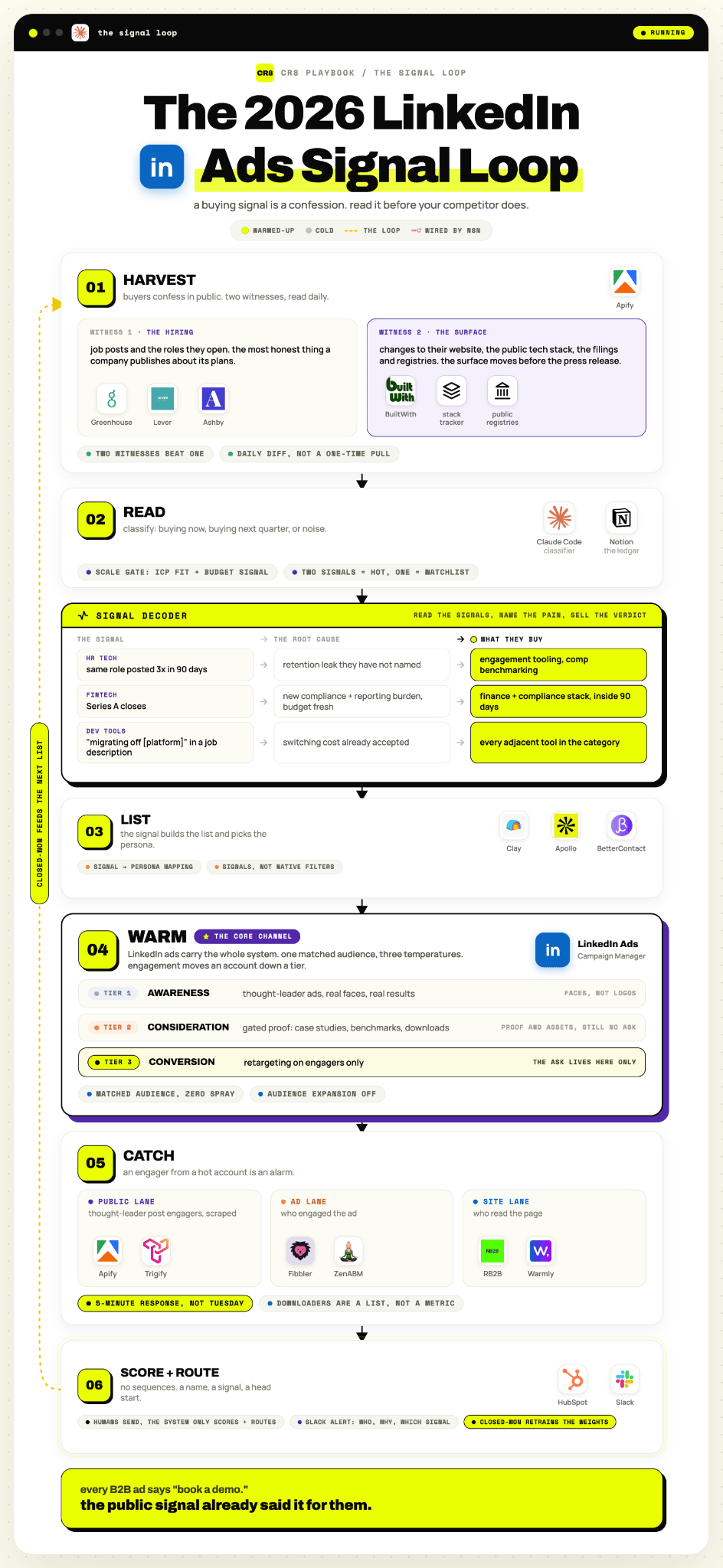
I recommend getting signal data with an agentic flow:
Step 1: Find the data source. In HR tech, for instance, that’s job boards like Indeed. In SaaS it can be technology data providers like BuildWith. Another option is industry-agnostic databases like Apollo.
Step 2: Pull and store the data. Apify for scraping, Notion for keeping the information, Claude for reading it.
Step 3: Make it recurring. New companies enter the space every week so the list renews weekly in the best case.
No stack? No problem! Open your 30 target accounts’ careers pages every Friday, spreadsheet, flag repeats. Ugly, but works.
Here’s the prompt skeleton for the reading step:
You are analyzing a company’s public hiring data to determine whether they are in, or entering, a buying window for [PRODUCT_CATEGORY].
INPUT
[N] days of job postings for {company}: title, first-posted date, repost count, full description text. Optionally: headcount trend, recent funding, tech stack mentions.
STEP 1 — DETECT SIGNALS (check each independently)
REPEAT_POSTING: same or near-identical role posted [3+] times in [90] days
→ broken: [retention leak they haven’t named]
→ they buy: [engagement tooling, comp benchmarking]FIRST_HIRE: first-ever [FUNCTION] role, no incumbent findable
→ broken: no owner, no process
→ they buy: [category], fast — no procurement, founder decidesSTALE_ROLE: role live [60+] days, unfilled
→ broken: sourcing
→ they buy: [assessment, sourcing tech]MIGRATION: “[INCUMBENT_PLATFORM] implementation/migration” in a JD
→ broken: switching cost already accepted
→ they buy: every adjacent tool in the category, [X]-day window[CUSTOM_SIGNAL]: [your vertical’s tell]
STEP 2 — DISQUALIFY BEFORE SCORING
Ghost jobs: evergreen postings, no edits [180+] days
Staffing agencies / RPOs posting on the company’s behalf
Duplicates across boards (count as one)
Outside [GEO] / [HEADCOUNT_RANGE] / [INDUSTRY_FILTER]
STEP 3 — MAP SIGNAL TO BUYER
REPEAT_POSTING → [hiring manager] · FIRST_HIRE → [founder/CEO]
STALE_ROLE → [Head of TA] · MIGRATION → [HRIS owner / CPO]
Every signal needs verbatim evidence quoted from the posting.
Confidence below 60 → NONE.
Prefer false negatives. Ad budget is expensive; a smaller
cleaner list beats a bigger dirty one.
RESPOND ONLY WITH JSON
{“company”:””,”signals”:[{“type”:””,”evidence”:”verbatim quote”,
“confidence”:0}],”diagnosis”:””,”buying_window”:”NOW|NEXT_90_DAYS|NONE”,
“target_persona”:””,”recommended_angle”:””,”disqualifiers_found”:[]}
Backtest it against your last 15 closed-won accounts before trusting it.
Then the list-building exercise: Apollo, BetterContact or similar to find the right decision-makers, their LinkedIn, their emails. Upload the list to LinkedIn as a matched audience.
Match rate matters: if yours is under roughly 70%, there are tools built for exactly this like Clay Ads and ContactLevel (industry average company match runs 29–62%, per Dreamdata). Matching takes about 48 hours.